
Fix your swing with the phone already in your bag.
Record one swing. Golf AI scores it, tells you which fault is costing you the most, and hands you the drills that fix it. No sensors. No launch monitor. No lesson booked three weeks out.
App Store
Hardware
None
To download
Free
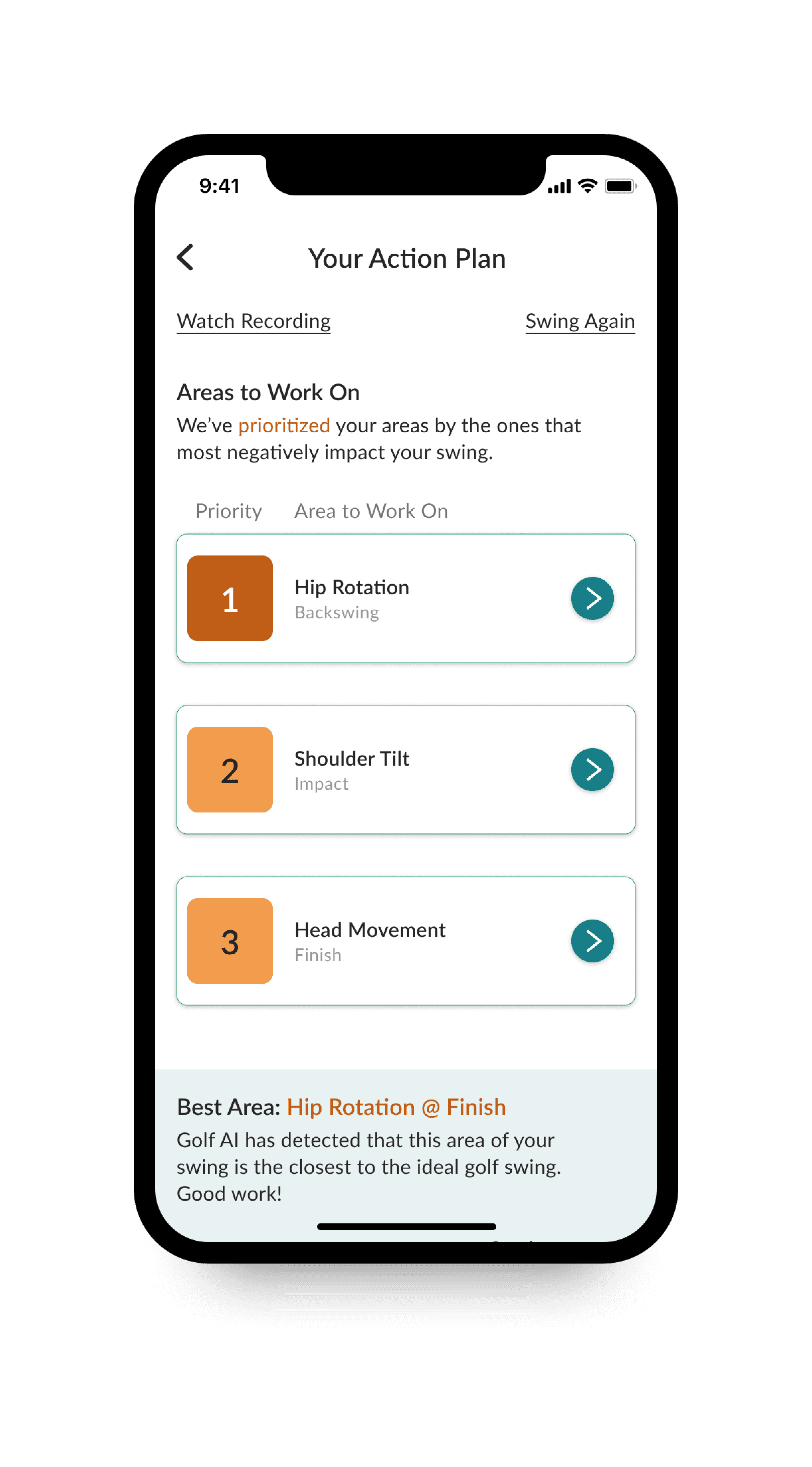 01 Action plan
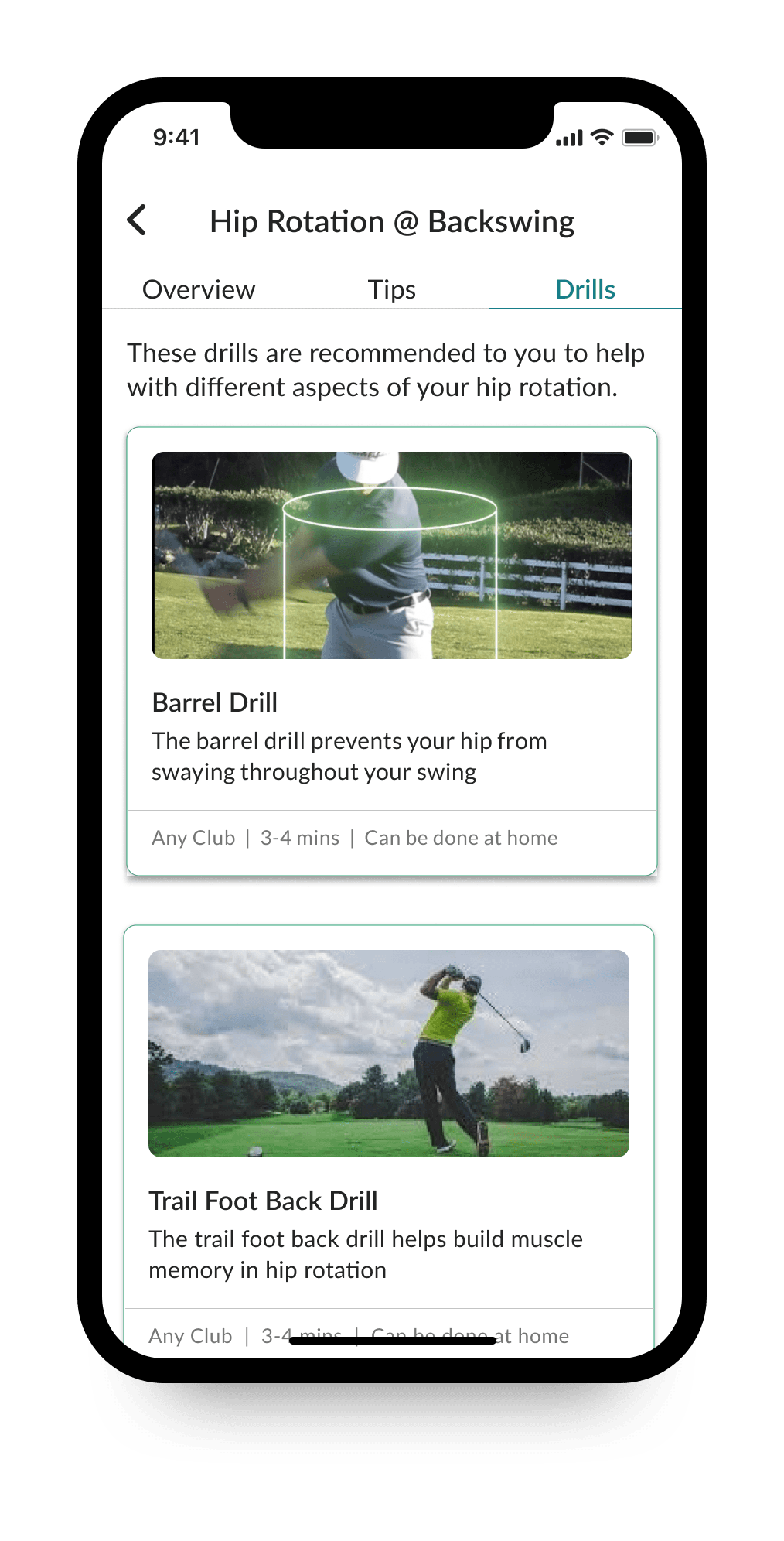 02 Drills
Three steps between a swing and a plan.
The whole loop takes about as long as waiting for the group ahead to clear the green.
- 01
Record your swing
Prop your phone up, hit a shot, and record — face-on or down-the-line. No sensors, no launch monitor, no special club. Already have a video? Upload it instead.
- 02
Get your score and plan
Golf AI grades the swing and returns an action plan that ranks what to work on — the areas hurting your swing most, tied to the exact phase they happen in.
- 03
Practise the right drills
Each priority comes with drills matched to that fault, with video demos and how long they take. Most can be done at home with any club.
It doesn’t just say what’s wrong. It says what to fix first.
Most swing tools hand you a wall of numbers and leave the interpretation to you. Golf AI ranks your faults by how much they’re actually costing your swing, and anchors each one to the moment it happens.
Ranked by impact. Priority 1 is the fault with the largest effect on your swing — not the first one the model happened to notice.
Pinned to a swing phase. Hip rotation at the backswing. Shoulder tilt at impact. Head movement at the finish. You know exactly where to look.
Credit where it’s due. It also flags the area closest to an ideal swing, so you know what not to break while fixing everything else.
A plan you can actually practise.
Every priority opens into drills chosen for that specific fault — each with a video demo, a short explanation of what it corrects, and the practical details that decide whether you’ll ever do it.
Club
Any club
Time
3–4 min
Where
At home
Drills also carry Overview and Tips tabs, so you get the reasoning behind the fix rather than a bare instruction to swing differently.
Everything in the app, in one place.
Swing score
One number that tracks whether your swing is actually getting better, not just different.
Prioritized action plan
Faults ranked by impact and pinned to a swing phase — backswing, impact, finish — so you fix the thing that matters first.
Curated drills
Every priority maps to drills with video demos, a time estimate, and whether you need a range or just a living room.
Progress over time
Swings are saved so you can put today’s next to the one from three months ago and see the change.
Upload existing video
Analyze footage you already shot — a lesson clip, a range session, a playing partner’s recording.
Built for iPhone
A native iOS app that uses the camera you already carry. Free to download, with Pro when you want everything.
Start free. Upgrade when it’s working.
Purchases are handled through the App Store and managed from your Apple account.
Free
$0
Download and try it
- Record a swing
- See your swing score
- Sample drills
Pro monthly
$4.99/mo
Golf AI Pro Monthly Pass
- Full action plans
- Complete drill library
- Upload your own video
- Progress tracking
Annual
$49.99/yr
Premium Annual Subscription
- Everything in Pro
- Two months off the monthly rate
- One payment a season
Golf AI is the golfer’s half of something bigger.
ParLinks Pro is where coaches and clubfitters will run their side of the game — lesson plans, fitting sessions, launch monitor data, player history. Golf AI is the app in your pocket, and the two are being joined so your swing data carries across instead of being re-explained every time.
Visit ParLinks ProConnect with coaches
Arrive at a lesson with your swing history already there.
Connect with clubfitters
Fitting sessions that start from how you actually swing.
One profile
Swings, sessions, and progress in a single place over time.
Questions, answered.
Still stuck? Get in touch and a person will read it.
Your next swing is a data point. Use it.
Free on the App Store, rated 4.4 by golfers who use it.
Download Golf AI